

When a WBGT or lightning event is triggered for a worksite, an automatic notification is sent to the relevant workers and supervisors. Notifications are not sent to admins. See below to understand what triggers an event.
ℹ️ To view what notifications have been sent to a worker or supervisor, go to their details page. To see what WBGT and lightning events have been triggered for a worksite, go to the worksite details page.
WBGT events
💡 The level names “Initial Heat” and “High Heat” used in the following table are examples. While most organizations use those two levels, you may configure as many levels as needed. The principles explained in the configuration apply to all levels you create.
Type | Level | Configuration |
Alert | 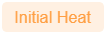 | Triggered when the WBGT reaches the worksite's initial heat threshold. This is set when adding a new worksite. To adjust the threshold, see How do I edit or delete a worksite? |
Alert | 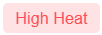 | Triggered when the WBGT reaches the worksite's high heat threshold. This is set when adding a new worksite. To adjust the threshold, see How do I edit or delete a worksite? |
Downgrade | | Triggered once the WBGT is maintained below the worksite's high heat threshold for the minimum alert time. To adjust the minimum alert time, see How do I customize WBGT alert parameters? |
Safe |  | Triggered once the WBGT is maintained below the worksite's initial heat threshold for the minimum alert time. To adjust the minimum alert time, see How do I customize WBGT alert parameters? |
Lightning events
Type | Level | Configuration |
Lightning strike |  | Triggered when lightning is detected within the outer zone radius from the worksite address. The radius size is the same for all worksites. To adjust the radius, see How do I customize lightning detection parameters? |
Lightning strike |  | Triggered when lightning is detected within the inner zone radius from the worksite address. The radius size is the same for all worksites. To adjust the radius, see How do I customize lightning detection parameters? |
Downgrade | | Triggered once no lightning is detected for the inactivity alert time. To adjust the inactivity alert time, see How do I customize lightning detection parameters? |
Safe | | Triggered once no lightning is detected for the inactivity alert time. To adjust the inactivity alert time, see How do I customize lightning detection parameters? |
Configuring personal notification settings
By default, automatic notifications are sent via email to workers. Workers can adjust their notification preferences in the mobile app.
Automatic notifications are sent via email to supervisors. For safety reasons, this cannot be adjusted.
💡 If a supervisor is receiving notifications for worksites they are not responsible for, consider adjusting the access levels.